Give your unused Android phone a second life as a PC performance dashboard with Pitikapp. Here’s how it works, how to set it up, and what’s new today in Windows 11 and smartphone security.
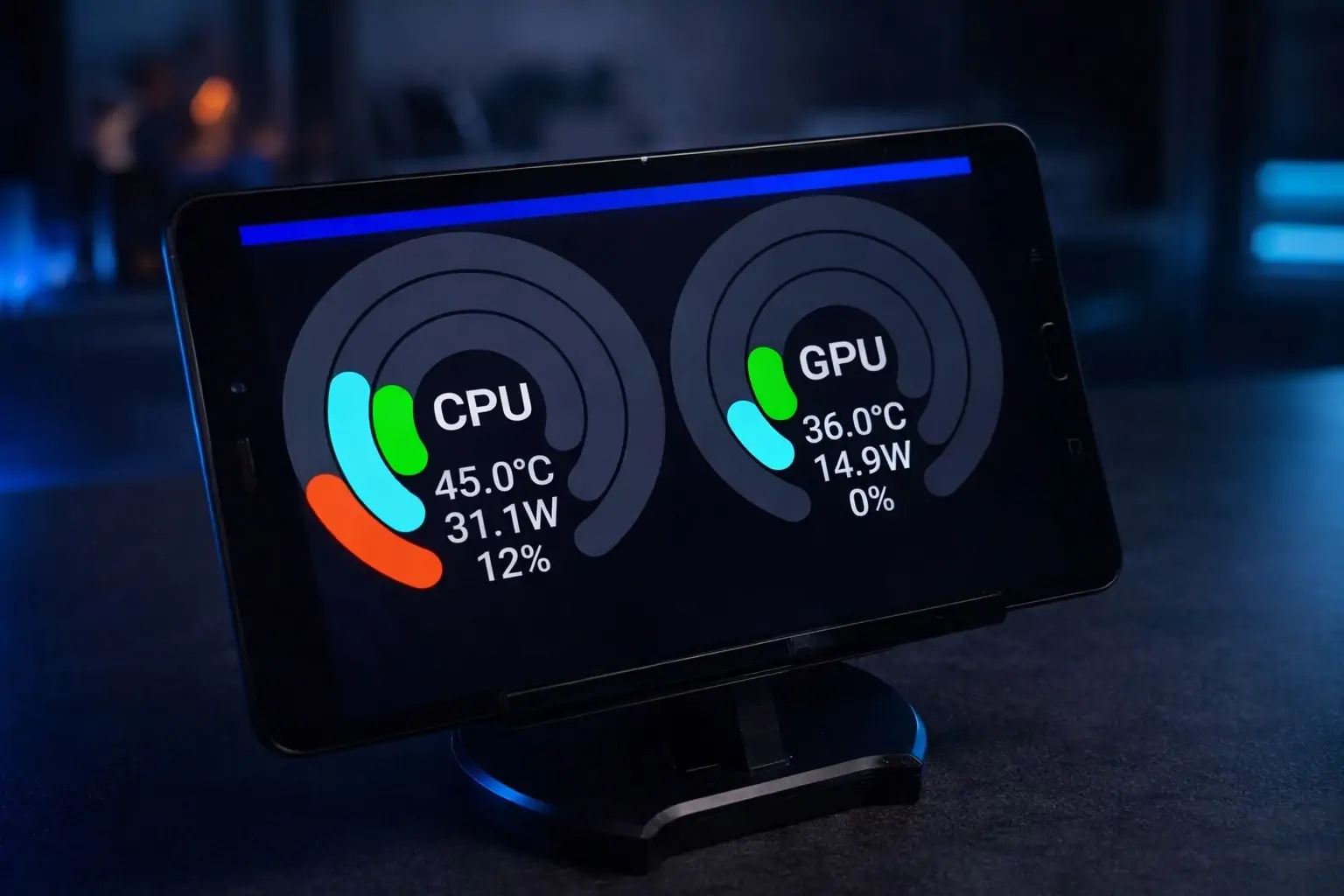
On January 11, 2026, one of the most practical “new uses” for old tech is getting a fresh burst of attention: repurposing an old Android phone as a dedicated PC stats monitor—basically a mini “sensor panel” you can keep on your desk to watch CPU/GPU temperatures, utilization, memory, fan speeds, and even frame rates while you game or work. MakeUseOf
This trend is also arriving at a moment when keeping devices longer is becoming more than just a personal preference. Across parts of the U.S., new 2026 policies are expanding electronics recycling programs and strengthening right-to-repair rules—while the recycling industry is warning about the rising risk of lithium-ion battery fires when electronics are disposed of improperly.
Below is a practical, publication-ready breakdown of the “old phone → PC dashboard” setup (with a spotlight on Pitikapp Remote Dashboard) plus a roundup of the most relevant today’s news connecting phones, PCs, and security.
Why turning an old phone into a PC dashboard is trending in 2026
1) It’s a low-cost “upgrade” that feels like new hardware
A phone you retired years ago still has a bright, high-resolution display, Wi‑Fi, and a touchscreen—perfect ingredients for a permanent monitoring screen that sits beside your keyboard. The current wave of interest is fueled by tools like Pitikapp, which can create a wireless link between a Windows PC and an Android (or iOS) device so your phone becomes a live dashboard instead of e‑waste.
2) Repair and reuse are getting policy tailwinds
As 2026 begins, multiple states have enacted or expanded laws that affect how electronics are repaired, recycled, and financed. A Waste Dive roundup notes that new measures include right-to-repair laws (including restrictions on “parts pairing” practices) and expanded electronics programs in several places. Waste Dive
Colorado advocates, for example, point to their new consumer electronics right-to-repair coverage beginning January 1, 2026, spanning devices like phones, laptops, printers, routers, and more—aimed at making repair options more accessible.
3) Battery safety is becoming an urgent issue
Battery-embedded devices are increasingly blamed for fires in waste and recycling facilities. A January 2026 report in Resource Recycling highlights new industry guidance and cites tracking that shows publicly reported fires at waste and recycling facilities hit a record 448 incidents in the U.S. and Canada in 2025, with lithium-ion batteries often implicated.
Repurposing a functional phone into a dashboard keeps it out of the disposal stream—and can delay or prevent that risk entirely.
What is Pitikapp and why it’s a good fit for an old Android phone?
Pitikapp Remote Dashboard is designed for a straightforward idea: keep a highly customizable dashboard on your phone/tablet that can monitor your computer and also trigger actions (commands/macros) back on the PC. The Google Play listing emphasizes that it requires no account and no complicated configuration, and it supports real-time monitoring using data from popular PC monitoring tools (like GPU‑Z, MSI Afterburner, Core Temp) to display temperatures, usage, fan speed, and frame rate.
Independent software listings echo the same pitch: install a server on the computer, install the mobile client, and connect them—often automatically when both are on the same network.
There’s also a practical privacy angle for readers who care: Apple’s App Store listing indicates “Data Not Collected” for the iOS version, which may reassure users considering an iPhone/iPad as a dashboard device. App Store
And for enthusiasts who like extendability, Pitikapp provides a plugin library for building modules—suggesting a broader ecosystem for custom dashboards beyond default widgets.
How to turn an old Android phone into a PC stats monitor (step-by-step)
This setup assumes you have:
- A Windows PC (gaming/workstation) connected to your home network
- An old Android phone with Wi‑Fi and a working screen
- A charger + cable (ideally a long one)
- Optional: PC monitoring utilities (depending on the stats you want)
Step 1: Prep the old phone for “dashboard life”
You want the phone to behave more like a tiny display than a daily driver.
- Update Android (if the device still supports updates) and install only what you need.
- Disable noisy notifications (or turn on Do Not Disturb) so popups don’t block your dashboard.
- Set the screen timeout longer (or “stay awake while charging” in Developer Options on many Android devices).
- Lower brightness to reduce heat and burn-in risk.
Tip for safety and longevity: If the phone will stay plugged in for hours daily, place it where it has airflow and isn’t sitting on a heat source like a PC exhaust path.
Step 2: Install Pitikapp server on the PC
Pitikapp is typically used as a PC server + mobile client pairing. The phone becomes the display; the PC provides the data.
- Download and install the Pitikapp server/client components from the official Pitikapp site.
- Run the Pitikapp PC app so it’s ready to be discovered by the phone.
Step 3: Install the Pitikapp mobile app on the old Android phone
From the Play Store, install Pitikapp Remote Dashboard. The app is positioned as requiring no account and minimal setup.
Network note: Most setups work best when the phone and PC are on the same Wi‑Fi network, and some guides note that the pairing can happen automatically under that condition.
Step 4: Connect the phone to the PC dashboard
Open the Pitikapp app on the phone. If your PC is running the server and both devices share the same network, it should discover the PC and connect (depending on firewall and network rules).
If it doesn’t:
- Check that Windows Firewall isn’t blocking the Pitikapp server
- Ensure the phone isn’t on a guest Wi‑Fi network that isolates devices
Step 5: Choose what you want to display (the “stats panel” part)
The most popular dashboard setup is:
- CPU temperature + utilization
- GPU temperature + utilization
- RAM usage
- Fan speed
- FPS or frame time (especially for gaming)
Pitikapp’s Play Store description points out it can use data from tools such as GPU‑Z, MSI Afterburner, and Core Temp to show these metrics in real time.
Step 6: Add PC “controls” (optional but useful)
A nice bonus: Pitikapp can do more than display stats. Documentation and community posts describe it as able to trigger actions such as controlling media playback, running a macro, or starting a program—turning the old phone into a small command console.
Step 7: Make it look good on your desk
A stats monitor is only useful if it’s visible.
- Put the phone on a stand (portrait often works best for vertical dashboards)
- Run the cable behind your monitor/desk
- Consider a matte screen protector if glare is a problem
Today’s related tech news (Jan. 11, 2026): why the phone–PC relationship is changing fast
The “old phone as a PC dashboard” trend lands in the middle of a broader shift: phones and PCs are becoming more tightly connected—while governments and regulators are pushing new security and repair expectations.
India proposes new smartphone security rules requiring source-code access
Two Reuters reports published today say India has proposed a security overhaul that could require smartphone makers to share source code with government-designated labs and implement other security measures (including limits on background access to sensitive permissions, and other requirements that have triggered industry objections).
For readers, the takeaway is simple: smartphone security policy is becoming more aggressive and more geopolitical—and it may influence how long devices stay supported and how updates are handled across regions.
Windows 11 is pushing harder into “handoff” style continuity with Android
Windows 11’s Cross Device Resume/“Resume” feature—often compared to Apple’s Handoff—has been evolving in Insider builds, and reporting suggests Microsoft is broadening how apps can integrate (so the feature can work with more apps beyond the earliest limited cases). Windows Latest
This matters for the old-phone dashboard idea because it reflects a bigger 2026 direction: phones are no longer treated as separate devices—they’re becoming companions to the PC workflow.
Phone Link gets “Expanded screen” for Android app mirroring
If you prefer bringing phone apps onto your PC instead of turning your phone into a separate dashboard, Microsoft’s Phone Link continues to expand. PCWorld reports that Phone Link’s “Expanded screen” feature is rolling out broadly, letting Android apps use up to about 90% of the Windows desktop surface (with caveats like compatibility and occasional blurriness). PCWorld
January Android security patches remain essential
Even for a “repurposed” phone, patching matters. Google’s Android Security Bulletin for January 2026 documents fixes tied to patch levels (including the 2026‑01‑05 security patch level) and notes a critical vulnerability in a Dolby codec component. Android Open Source Project
If your old phone is no longer receiving updates, that’s a strong reason to keep it on a trusted network and limit what accounts and sensitive apps it can access.
Best practices and cautions before you mount that old phone permanently
Security: treat the dashboard phone as a “trusted accessory,” not your primary device
If the phone is years out of date, don’t log into banking apps on it. Keep it dedicated to monitoring, and limit permissions to what the dashboard actually needs.
Heat and batteries: don’t ignore the basics
Long charging sessions + heat are what degrade batteries fastest. With recycling facilities reporting more lithium-ion incidents, it’s another reminder to keep old devices in safe operating conditions and recycle responsibly when they’re truly done.
Know your local rules and programs
With expanded electronics and battery policies rolling into effect across regions, you’ll increasingly see disposal fees, take-back programs, or repair requirements depending on where you live.
Bottom line: a tiny PC “command screen” is one of the best uses for an old Android phone in 2026
If you have a spare Android device sitting in a drawer, turning it into a PC stats monitor is one of those rare projects that is:
- genuinely useful (especially for gaming/thermals),
- fast to set up,
- and aligned with the bigger 2026 push toward longer device lifespans and safer electronics handling.
And today’s headlines—from proposed smartphone security rules in India to Windows 11’s expanding Android continuity features—underscore the same point: the phone–PC ecosystem is tightening, and even an “old” phone can still play a valuable role at your desk. Reuters